Light Curve Manipulation
Commands that transform, resample, or reinterpret the light curve in-memory — column arithmetic, time manipulation, unit conversions, and Fourier transforms of evenly-sampled data.
sortlc — Sort observations
Syntax
Description
Sort the light curve observations. By default, observations are sorted by time (ascending). Use var to sort by another named variable (e.g. "mag") and reverse=True to sort in descending order. If a subsequent command requires time-sorted data, vartools automatically restores time order at the start of that command.
CLI equivalent: -sortlc.
Parameters
| Parameter | Type | Description |
|---|---|---|
var |
str or None |
Name of the variable to sort by. None (default) sorts by time. |
reverse |
bool |
Sort in descending order instead of ascending. |
Output
Modifies the LC in-place: reorders all per-observation vectors by the chosen sort key; no output statistics.
Examples
lc = vt.LightCurve.from_file("EXAMPLES/2")

# Reverse-time sort
(vt.Pipeline().sortlc(reverse=True)
              .o("EXAMPLES/OUTDIR1/2.rev.txt")).run(lc)

# Sort by magnitude (brightest first)
(vt.Pipeline().sortlc(var="mag")
              .o("EXAMPLES/OUTDIR1/2.magsorted.txt")).run(lc)
binlc — Bin in time
Syntax
cmd.binlc(method="average", binsize=None, nbins=None,
          time_output="tcenter", bincolumns=None,
          bincolumnsonly=False, T0=None, binshift=None,
          maskpoints=None)
Description
Bin the light curve in time (or in phase, when applied after a Phase command). All light-curve vectors are binned together using the chosen statistic. Specify the bin width via binsize or the total number of equal-width bins via nbins (one of the two is required).
CLI equivalent: -binlc.
Parameters
| Parameter | Type | Description |
|---|---|---|
method |
str |
Combination statistic: "average", "median", or "weightedaverage". |
binsize |
float or str |
Bin width in time (or phase) units. Either binsize or nbins must be provided. Accepts variable names and expressions. |
nbins |
int or str |
Number of equal-width bins to divide the time span into (alternative to binsize). |
time_output |
str |
Output time for each bin: "tcenter", "taverage", "tmedian", or "tnoshrink" (replace each point with its binned value without shrinking the LC). |
bincolumns |
str or None |
Override the binning statistic for specific named columns, e.g. "col1,col2:median". |
bincolumnsonly |
bool |
With time_output="tnoshrink", restrict replacement to columns listed in bincolumns. |
T0 |
float, str, or None |
Reference time for bin-edge alignment. A float emits "fix T0"; a string is split and forwarded verbatim (e.g. "list" or "fixcolumn colname"). |
binshift |
float, str, or None |
Shift the first bin edge by binshift * binsize. binshift is dimensionless (canonical use 0 <= binshift < 1; binshift=0.5 produces a half-bin shift). Accepts variable/expression forms. |
maskpoints |
str or None |
Mask variable; only points with maskvar > 0 contribute. Masked-out points still receive the binned value when tnoshrink is active. |
Output
Modifies the LC in-place: replaces all per-observation vectors with their binned values (the LC length is reduced unless time_output="tnoshrink"); no output statistics.
Examples
lc = vt.LightCurve.from_file("EXAMPLES/2")

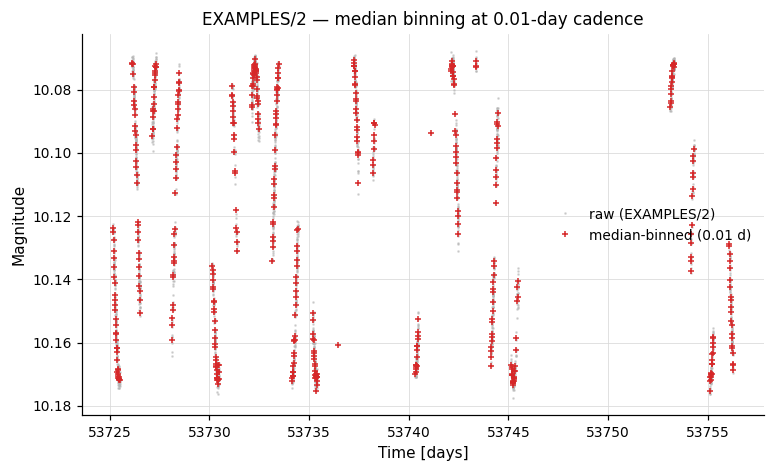
# Bin in time with 0.01-day bins (median combination)
result = lc.binlc(method="median", binsize=0.01)
binned_lc = result.lc

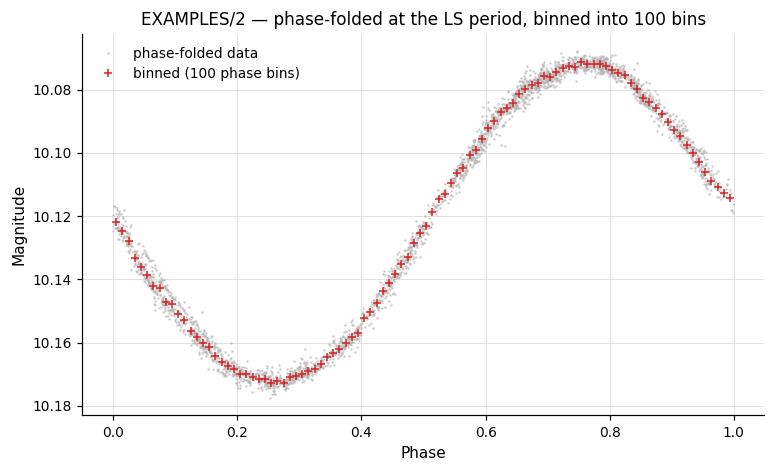
# Phase-fold then bin into 100 phase bins.  `cmd.Phase(period="ls")`
# back-references the prior LS and works both in a single Pipeline and
# across chain steps.
pipe = (vt.Pipeline()
        .LS(0.1, 10.0, 0.1, npeaks=1)
        .Phase(period="ls")
        .binlc(method="median", nbins=100))
result = pipe.run(lc, capture_lc=True)
phase_binned_lc = result.lc
Phase — Phase-fold the light curve
Syntax
Description
Replace the time axis of the light curve with its phase, computed as ((t − T0) mod P) / P, and sort by phase. Phases run from 0 to 1 by default (or from startphase to startphase + 1). After Phase, time-based binning commands like binlc operate in phase space.
CLI equivalent: -Phase.
Parameters
| Parameter | Type | Description |
|---|---|---|
period |
float or str |
Period to fold on. Accepts a number, or a back-reference keyword: "ls", "aov", "bls", "fixcolumn NAME", "list". |
T0 |
float, str, or None |
Reference epoch. Accepts a number, or "bls <phase_offset>" to derive T0 = Tc − phase_offset · Period from the prior BLS result (e.g. T0="bls 0.5" puts mid-transit at phase 0.5). Default: the earliest time in the LC. |
phasevar |
str or None |
Name of the output phase variable. Default: overwrites t. |
startphase |
float or None |
Starting phase (default 0). Phase range becomes [startphase, startphase + 1). |
Back-references work across chain steps
period accepts "ls", "aov", "bls", and "fixcolumn NAME"; T0 accepts the "bls <phase_offset>" form. All of these resolve correctly inside a single Pipeline and across chain boundaries (e.g. lc.LS(...).Phase(period="ls") or lc.BLS(...).Phase(period="bls", T0="bls 0.5")). In batch-chain mode the resolved values become per-LC, so each light curve is folded on its own period / Tc. Missing prior command → LookupError.
Output
Modifies the LC in-place: replaces t (or writes to phasevar) with phase values and re-sorts the LC; no output statistics.
Examples
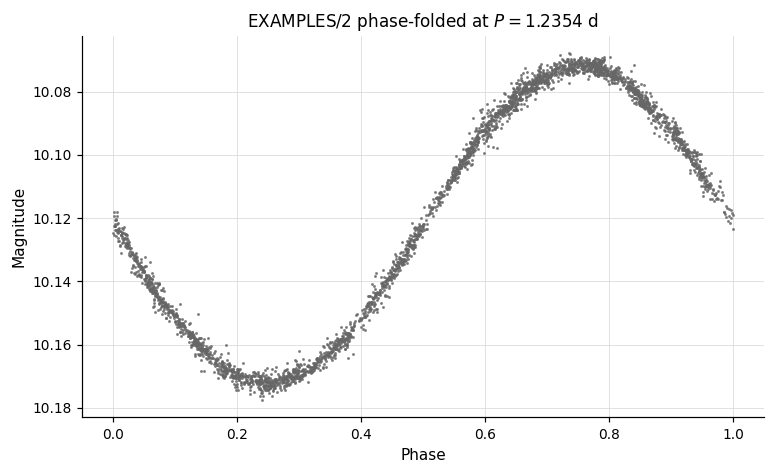
lc = vt.LightCurve.from_file("EXAMPLES/2")

# Phase-fold at a known period
result = lc.Phase(period=1.2354)
phased_lc = result.lc   # time column replaced by orbital phase

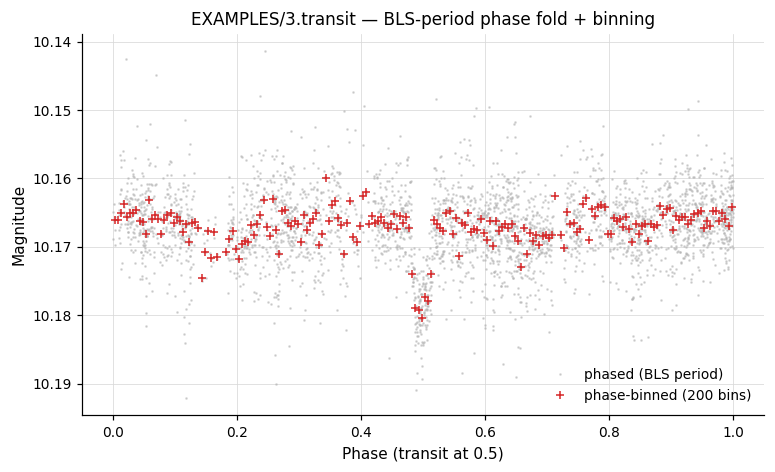
# Use period found by BLS, set mid-transit at phase 0.5.
# `period="bls"` and `T0="bls 0.5"` work across the chain boundary —
# pyvartools reads BLS_Period_1 / BLS_Tc_1 from the prior result.
lc_transit = vt.LightCurve.from_file("EXAMPLES/3.transit")
result = (
    lc_transit
        .BLS(0.5, 5.0, rmin=0.01, rmax=0.1, nbins=200, nfreq=20000, npeaks=1)
        .Phase(period="bls", T0="bls 0.5")
        .binlc(method="median", nbins=200)
)
phase_binned_lc = result.lc
resample — Resample onto a new time grid
Syntax
cmd.resample(method="linear",
             left=None, right=None,
             nbreaks=None, order=None,
             file_times=None, file_column=None,
             list_column=None, t_column=None,
             gaps=None,
             tstart=None, tstop=None, delt=None, Npoints=None)
Description
Resample the light curve onto a new time base by interpolating all light-curve vectors. The default output grid runs from the first to the last observed time with a step equal to the minimum observed time separation. Specify the new grid with delt (step size), Npoints (number of points), or file_times (times read from a file). String-type columns (e.g. image IDs) are always resampled with the "nearest" method.
CLI equivalent: -resample.
Parameters
| Parameter | Type | Description |
|---|---|---|
method |
str |
Interpolation method: "nearest", "linear", "spline", "splinemonotonic", or "bspline". |
left |
float or None |
First-derivative boundary condition at the left edge of the spline. Only for method="spline" (or "splinemonotonic"). |
right |
float or None |
First-derivative boundary condition at the right edge of the spline. |
nbreaks |
int or None |
Number of interior break points for B-spline fitting. Only for method="bspline". If < 2, breaks are increased until χ²/dof ≤ 1 (can be slow). |
order |
int or None |
Polynomial order of the B-spline (only for method="bspline"). |
file_times |
str or None |
Source for the new time grid. Either: (a) a path string → resample to the times in that file (the same grid is used for every LC), or (b) the literal "list" → resample, per LC, to the times in a file whose path is read from a column of the input list file (list-mode runs only). |
file_column |
int or None |
Legacy alias for t_column in path mode. Prefer t_column. |
list_column |
int or None |
Only with file_times="list". 1-based column number in the input list file that holds the per-LC time-grid filename. When omitted, the next unused list-file column is consumed. |
t_column |
int or None |
1-based column number in the time-grid file that holds the time values. Defaults to 1. |
gaps |
str or None |
Gap-handling spec, e.g. "percentile_sep 80 bspline" — switches interpolation method beyond a separation threshold. |
tstart, tstop |
float, str, or None |
Start and stop of the new time grid. Accepts variable/expression/per-LC forms. |
delt |
float, str, or None |
Time step of the new grid. |
Npoints |
int, str, or None |
Number of points in the new grid (alternative to delt). |
Output
Modifies the LC in-place: replaces every per-observation vector by interpolating onto the new time grid; no output statistics.
Examples
lc = vt.LightCurve.from_file("EXAMPLES/2")

# Linear interpolation with default time grid
result = lc.resample(method="linear")

# Monotonic spline onto a fixed time grid with 1000 points
result2 = lc.resample(method="splinemonotonic",
                      tstart=53726, tstop=53756, Npoints=1000)

# B-spline with 20 break points, order 3
result3 = lc.resample(method="bspline", nbreaks=20, order=3, Npoints=500)

# List-form back-resampling: bin to a coarse grid, then resample back
# onto each LC's *original* time grid.  list_column=1 says read the
# time-grid filename from column 1 of the list file (the LC path
# itself); t_column=1 says read times from column 1 of that file.
import os, tempfile
list_path = os.path.join(tempfile.mkdtemp(), "lclist.txt")
with open(list_path, "w") as f:
    f.write("EXAMPLES/2\n")
batch = (vt.Pipeline()
         .binlc(method="average", binsize=0.05)
         .resample(method="linear",
                   file_times="list", list_column=1, t_column=1)
         .rms()
         ).run_filelist(list_path, capture_lc=True)
print(batch.vars[["Name", "RMS_2"]])
expr — Analytic expression
Syntax
Description
Evaluate an analytic expression and assign the result to a named variable. The expression has the form varname=formula, e.g. "residual=mag-model". If the variable does not yet exist it is created as a per-observation light-curve vector by default; the optional vartype keyword selects another lifetime — see the vartype aggregation note below.
The expression engine supports aggregate functions like mean(mag), stddev(mag), pct(mag, 95.0), and filtering like mean(mag, t>53730). See the Analytic Expressions reference for the complete list of operators, functions, and constants.
Operator names
The expression grammar follows C, not NumPy: modulo is t%P (not mod(t, P)), power is mag^2 (not mag**2), and there is no np. prefix on functions (sqrt, log, sin, etc. are bare names).
CLI equivalent: -expr.
Parameters
| Parameter | Type | Description |
|---|---|---|
expression |
str |
Expression of the form varname=formula. The LHS may reference any existing light-curve vector, scalar from prior commands, or output-column header name. |
vartype |
str or None |
Type of the LHS variable: None (per-observation, default), "listvar" (per-star), "scalar" (per-thread), or "const" (global constant). See vartype and aggregate functions. If the variable already exists, its type is preserved regardless of this setting. |
outputcolumn |
bool |
If True, expose the LHS variable's value as a column in the result table (named Expr_<varname>_<command-index>). Only valid when vartype is "listvar", "scalar", or "const"; passing outputcolumn=True with vartype=None raises ValueError at construction (the value would otherwise be per-observation, not a single column). Default False. |
Output
Modifies the LC in-place: creates or updates the named variable. Emits no statistics columns by default. When outputcolumn=True, an Expr_<varname>_<command-index> column is added to the result table.
Examples
lc = vt.LightCurve.from_file("EXAMPLES/1")

# Apply a mathematical transform in-place
result = lc.expr("mag=sqrt(mag+5)")

# Compute per-star mean magnitude using an aggregate function.
# `avg` is a `listvar` variable created inside vartools — it must be visible
# to the next `-expr` step, so these three commands share one Pipeline.
pipe = (vt.Pipeline()
        .expr("avg=mean(mag)", vartype="listvar")
        .expr("dmag=mag-avg")
        .rms())
result = pipe.run(lc)

# Same as above but expose the per-star mean in the result table.
# `outputcolumn=True` adds a column named `Expr_avg_<command-index>`.
pipe = (vt.Pipeline()
        .expr("avg=mean(mag)", vartype="listvar", outputcolumn=True)
        .expr("dmag=mag-avg")
        .stats("dmag", "median,stddev"))
result = pipe.run(lc)
print(result.vars["Expr_avg_0"])         # the per-star mean magnitude

# Define a global constant and use it
pipe = (vt.Pipeline()
        .expr("zp=25.0", vartype="const")
        .expr("flux=10^(-0.4*(mag-zp))"))

# Convert to flux, normalise by median, then compute statistics
pipe = (vt.Pipeline()
        .expr("flux=10^(-0.4*(mag-25.0))")
        .stats("flux", ["median"])
        .expr("flux=flux/STATS_flux_MEDIAN_1")
        .stats(["flux", "mag"], ["median", "stddev"]))
result = pipe.run(lc)
print(result.vars["STATS_flux_MEDIAN_1"])   # original median flux
print(result.vars["STATS_flux_MEDIAN_3"])   # ≈ 1.0 after normalisation
FFT / IFFT — Fast Fourier Transform
Syntax
cmd.FFT(input_real, input_imag, output_real, output_imag)
cmd.IFFT(input_real, input_imag, output_real, output_imag)
Description
Compute the Fast Fourier Transform (FFT) or inverse Fast Fourier Transform (IFFT) of two named light-curve variables (real and imaginary parts), using GSL's gsl_fft_complex_forward() / ..._backward(). Element k of the transform corresponds to frequency k / (N · Δ) for k < N/2 (negative frequencies for k > N/2), where Δ is the assumed uniform time step and N is the number of points.
Use "NULL" for either input component to substitute a zero vector; use "NULL" for either output component to discard that component.
Parameters
| Parameter | Type | Description |
|---|---|---|
input_real |
str |
Name of the LC vector holding the real part of the input signal, or "NULL". |
input_imag |
str |
Name of the LC vector holding the imaginary part, or "NULL". |
output_real |
str |
Variable name to store the real part of the transform, or "NULL". |
output_imag |
str |
Variable name to store the imaginary part of the transform, or "NULL". |
Output
Modifies the LC in-place: writes the transform into the named output variables; no output statistics.
Examples
lc = vt.LightCurve.from_file("EXAMPLES/11")

# High-pass Fourier filter on a uniformly sampled light curve
pipe = (vt.Pipeline()
        .FFT("mag", "NULL", "fftreal", "fftimag")
        .rms()
        .expr("fftreal=(NR>(Npoints_1/500.0))*(NR<(Npoints_1*499.0/500.0))*fftreal")
        .expr("fftimag=(NR>(Npoints_1/500.0))*(NR<(Npoints_1*499.0/500.0))*fftimag")
        .IFFT("fftreal", "fftimag", "mag_filter", "NULL"))
result = pipe.run(lc, capture_lc=True)
difffluxtomag / fluxtomag — Flux conversions
Syntax
Description
Convert flux values to magnitudes:
fluxtomag— Convert absolute flux to magnitude usingmag = mag_constant − 2.5·log10(flux) + offset.difffluxtomag— Convert ISIS image-subtraction differential flux to magnitude usingmag = mag_constant − 2.5·log10(ref_flux + diff_flux) + offset. Requires a list input where the reference magnitude of each star (after aperture correction) is supplied as an additional column.
mag_constant and offset accept numbers, variable names, or expression strings.
CLI equivalent: -fluxtomag / -difffluxtomag.
Parameters
| Parameter | Type | Description |
|---|---|---|
mag_constant |
float or str |
Magnitude corresponding to a flux of 1 ADU (zero-point). |
offset |
float or str |
Additive constant applied to the output magnitudes. |
magcolumn |
int or None |
(difffluxtomag only) Column in the input list containing the reference magnitude. Default: next available column. |
Output
Modifies the LC in-place: replaces mag with the converted magnitude values; no output statistics.
Examples
# Synthesize a flux-unit light curve from an existing magnitude LC,
# then convert it back to magnitudes using `fluxtomag`.
import numpy as np

lc_mag = vt.LightCurve.from_file("EXAMPLES/2")
t, mag, err = lc_mag.t, lc_mag.mag, lc_mag.err
flux = 10.0 ** (-0.4 * (mag - 25.0))
lc_flux = vt.LightCurve.from_arrays(t, flux, err * flux * np.log(10) / 2.5)

# `mag_constant` is the zero-point magnitude (here 25.0, matching the
# synthesis above).
result = lc_flux.fluxtomag(25.0, offset=0.0)
print(result.lc.mag[:3])   # back to approximately the original values
magtoflux — Magnitude to flux conversion
Syntax
Description
Convert magnitudes to fluxes. This is the inverse of fluxtomag:
NaN and Inf inputs propagate through to the output.
When normalize=True, the fluxes are computed with an arbitrary internal zero-point and then both the flux and flux-uncertainty arrays are divided by the median flux (NaNs rejected), so the output light curve has a median flux of 1. mag_constant and normalize=True are mutually exclusive.
CLI equivalent: -magtoflux.
Parameters
| Parameter | Type | Description |
|---|---|---|
mag_constant |
float or str |
Magnitude corresponding to a flux of 1 ADU (zero-point). Required unless normalize=True. Accepts a number, variable name, or expression string. |
normalize |
bool |
If True, divide the output flux array (and uncertainties) by the median flux so the result has median 1. Cannot be combined with mag_constant. |
Output
Modifies the LC in-place: replaces mag with the converted flux values, err with the propagated flux uncertainties; no output statistics.
Examples
Round-trip: convert EXAMPLES/2 to flux and back, recovering the original magnitudes to floating-point precision.
import numpy as np

lc_orig = vt.LightCurve.from_file("EXAMPLES/2")
mag_in = lc_orig.mag.copy()

result = lc_orig.fluxtomag(25.0, offset=0.0).magtoflux(25.0)
mag_back = result.lc.mag
print(np.max(np.abs(mag_back - mag_in)))   # roughly 1e-14
Normalize: convert to flux and divide by the median flux so the output has median 1.
result = vt.LightCurve.from_file("EXAMPLES/2").magtoflux(normalize=True)
flux = result.lc.mag
print(np.median(flux))   # 1.0
print(flux.min(), flux.max())
changeerror — Rescale measurement uncertainties
Syntax
Description
Replace the formal per-point measurement uncertainties with the RMS of the light curve. Useful before χ² or MCMC fitting when the quoted uncertainties are known to be mis-calibrated, or when no formal errors are available.
CLI equivalent: -changeerror.
Parameters
| Parameter | Type | Description |
|---|---|---|
maskpoints |
str or None |
Mask variable; only points with maskvar > 0 contribute to the RMS. |
Output
Suffix N is the pipeline command index.
| Column | Description |
|---|---|
Mean_Mag_N |
Mean magnitude of the light curve. |
RMS_N |
RMS of the light curve (the value the err column is replaced with). |
Npoints_N |
Number of points used. |
The LC's err column is also modified in-place: every entry becomes the value reported as RMS_N.
Examples
lc = vt.LightCurve.from_file("EXAMPLES/4")
result = (
    lc.chi2()
      .changeerror()
      .chi2()
)
print(result.vars["Chi2_0"])   # 5.19874 (original)
print(result.vars["Chi2_2"])   # ≈ 1.0 (after rescaling errors to RMS)
converttime — Time system conversion
Syntax
cmd.converttime(input_format, output_format, ra=None, dec=None,
                input_subtract=None, output_subtract=None,
                input_sys=None, output_sys=None, ephemfile=None,
                leapsecfile=None)
Description
Convert the light curve's time column between Modified Julian Date (MJD), Julian Date (JD), Heliocentric Julian Date (HJD), and Barycentric Julian Date (BJD) systems. BJD conversion requires VARTOOLS to be linked to the JPL NAIF cspice library. The internal precision near J2000.0 is approximately 0.1 milliseconds. For HJD/BJD conversions, provide ra and dec in degrees.
CLI equivalent: -converttime.
Parameters
| Parameter | Type | Description |
|---|---|---|
input_format |
str |
Input time system: "mjd", "jd", "hjd", or "bjd". |
output_format |
str |
Output time system. |
ra |
float, str, or None |
Right ascension (deg) for HJD/BJD. A float emits "radec fix ra dec" (requires dec); a string is split and forwarded verbatim (e.g. "list"). |
dec |
float or None |
Declination (deg), used together with a numeric ra. |
input_subtract |
float or None |
Constant subtracted from the stored input times (e.g. 2400000 if input is HJD-2400000). |
output_subtract |
float or None |
Constant subtracted from the output times. |
input_sys |
str or None |
Input time system: "tdb" or "utc". Default: UTC. |
output_sys |
str or None |
Output time system: "tdb" or "utc". |
ephemfile |
str or None |
Path to a JPL ephemeris kernel (BJD/TDB conversions). |
leapsecfile |
str or None |
Path to a leap-second kernel file. |
Output
Modifies the LC in-place: replaces t with times in the requested system; no output statistics.
Examples
lc = vt.LightCurve.from_file("EXAMPLES/1")

# Convert JD (minus 2400000) to HJD for a known sky position
result = lc.converttime(
    input_format="jd",
    output_format="hjd",
    ra=88.079166,
    dec=32.5533,
    input_subtract=2400000.0,
)
hjd_lc = result.lc
match — Match against a catalog
Syntax
cmd.match(catalog, matchcolumn, addcolumns, missing="nanmissing",
          source="file", inlist_column=None, skipnum=None,
          skipchar=None, delimiter=None, opencommand=None)
Description
Perform a row-by-row match of an external data file to the light curve, merging columns from the catalog into the LC. The match is performed on a specified variable (by default the time t). Float/double columns are matched within the tolerance set by the global -jdtol; all other types are matched exactly. New variables are created from the catalog; existing variables are overwritten.
CLI equivalent: -match.
Parameters
| Parameter | Type | Description |
|---|---|---|
catalog |
str |
Path to the catalog file (FITS table for .fits extensions). Ignored when source="inlist". |
source |
str |
"file" (default) — one catalog for all LCs; "inlist" — each LC specifies its own catalog in a list column. |
inlist_column |
str, int, or None |
Column number/name in the input list that holds per-LC catalog paths. Required when source="inlist". |
matchcolumn |
str |
Match-key spec: "varname:colnum" (e.g. "t:1") or just "colnum". |
addcolumns |
str |
Comma-separated varname:colnum[:dtype[:colformat]] specs for columns to import (e.g. "ra:2,dec:3"). |
missing |
str |
How to handle unmatched rows: "cullmissing", "nanmissing", or "missingval <value>". |
skipnum |
int or None |
Number of header lines to skip in the catalog. |
skipchar |
str or None |
Comma-separated comment characters (default #). |
delimiter |
str or None |
Column delimiter (default whitespace). |
opencommand |
str or None |
Shell pre-processor for each match file; %s is replaced with the filename. |
Output
Modifies the LC in-place: appends the imported columns as new LC variables (or overwrites existing ones). With missing="cullmissing", unmatched rows are removed from the LC. No output statistics.
Examples
# Join EXAMPLES/1 with the dates file by time, importing the
# imagename string column and culling unmatched rows.
lc = vt.LightCurve.from_file("EXAMPLES/1")
(vt.Pipeline()
        .match("EXAMPLES/dates_tfa",
               matchcolumn="t:2",
               addcolumns="imagename:1:string",
               missing="cullmissing")
        .o("EXAMPLES/OUTDIR1/1_withID.txt",
           columnformat="imagename,t,mag,err")).run(lc)
rescalesig / ensemblerescalesig — Rescale per-point uncertainties
Syntax
Description
Rescale the formal per-point magnitude uncertainties so that the reduced χ² (relative to the weighted mean magnitude) equals 1.
rescalesigoperates on each light curve independently — one rescale factor per LC.ensemblerescalesigcomputes a single rescaling factor from the full collection of light curves by fitting a linear relation betweenE(rms)²andχ²·E(rms)²across the ensemble (whereE(rms)is the expected RMS based on the photometric uncertainties). The result is that χ²/dof is distributed about unity across the ensemble. Requires a list input; all light curves are read into memory. This is the more common choice for survey-scale photometry pipelines dominated by well-behaved constant sources.
CLI equivalents: -rescalesig, -ensemblerescalesig.
Parameters
| Parameter | Type | Description |
|---|---|---|
sigclip |
float |
(ensemblerescalesig only) σ-clipping threshold for identifying outlier stars during the ensemble factor determination. Default 5.0. |
maskpoints |
str or None |
Mask variable; only points with maskvar > 0 contribute to the χ²/dof and expected RMS. |
Output
Suffix N is the pipeline command index. Both commands emit the same column name:
| Column | Description |
|---|---|
SigmaRescaleFactor_N |
Factor applied to the LC's err column. For rescalesig this is sqrt(chi2_before); for ensemblerescalesig it is the average rescale factor sqrt(chi2_after / chi2_before) for each LC. |
The LC's err column is also modified in-place by the chosen factor.
Examples
lc = vt.LightCurve.from_file("EXAMPLES/4")

# Per-LC rescaling: chi2_before, rescale, chi2_after ≈ 1
result = (
    lc.chi2()
      .rescalesig()
      .chi2()
)
print(result.vars["Chi2_0"])                  # 5.19874 (original)
print(result.vars["SigmaRescaleFactor_1"])    # 0.43858 — applied factor
print(result.vars["Chi2_2"])                  # ≈ 1.0 after rescaling
Shared topics
vartype and aggregate functions
The vartype parameter on expr controls what kind of variable is created on the left-hand side:
None(default) — per-observation light-curve vector, one value per point."listvar"— per-star variable that persists across all light curves. LC vectors on the RHS are evaluated at the first observation (index 0). Useful with aggregate functions."scalar"— per-thread scalar value."const"— global constant, same value for all LCs.
Aggregate functions operate over all observations in the current light curve and return a single scalar value. They are most useful with vartype="listvar" to compute per-star summary statistics:
mean(x [, filter]),median(x),stddev(x),MAD(x)vmin(x),vmax(x),sum(x)pct(x, pctval),wpct(x, w, pctval)weightedmean(x, w),wmedian(x, w)kurtosis(x),skewness(x),meddev(x),medmeddev(x)
All accept an optional filter argument, e.g. mean(mag, t>53730) computes the mean of mag only for observations where t > 53730. See the Analytic Expressions reference for the full list of operators, scalar functions, aggregate functions, and constants.